
Hagerty
HagertyAuto & Vehicles
4.9108.00 Reviews
- Version
- 26.07.04
- Installs
- 50.00K
- Age Rating
- Everyone
Screenshots
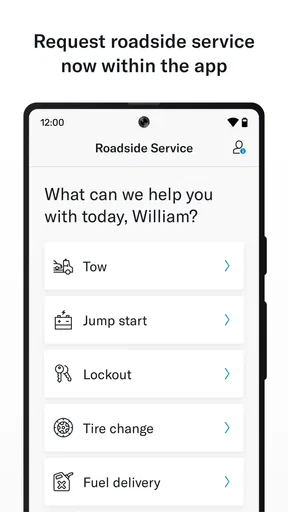
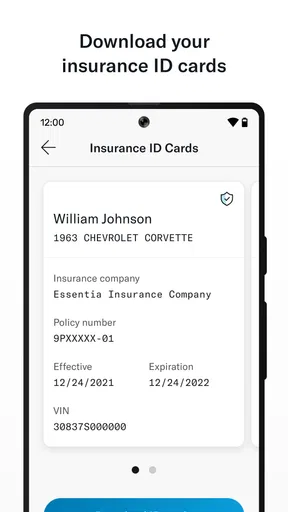
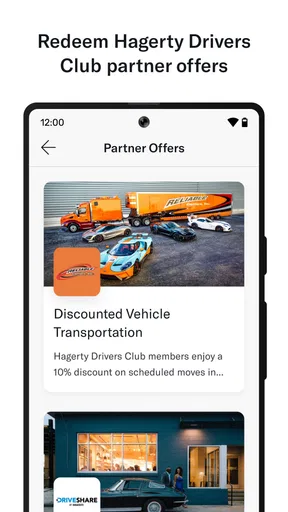
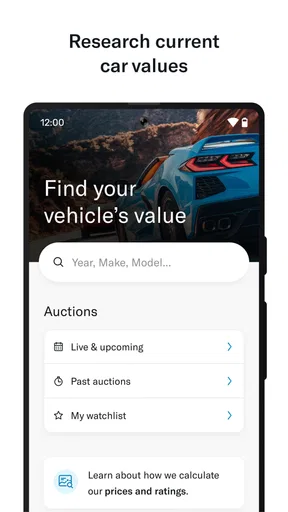
Our Review of Hagerty
 Analysis by Appyee
Hagerty is the kind of app I would open with a specific car-related task in mind rather than browse casually for entertainment. Developed by Hagerty, it sits in the Auto & Vehicles category and connects the company’s insurance and membership focus with a mobile experience. I found it most relevant for owners of enthusiast, classic, collector, or otherwise special vehicles who want a more direct way to stay connected with Hagerty.
The app is free, carries an Everyone age rating, and has built a strong reputation with a 4.9 average from around one thousand ratings. That combination makes it easy to try without committing money up front. Still, the real question is not whether it is popular, but whether its design and purpose fit the way you manage your vehicle life. In my experience, the answer depends heavily on whether you already use Hagerty or are considering its insurance and membership services.
How the app feels to use day to day
I find the day-to-day experience works best when I open the app with one clear Hagerty-related task, rather than expecting it to manage every part of owning a car. That focused approach can make account and membership checks feel less cluttered, while also helping me decide when a separate tool is the better fit.
Readable screens and a fairly direct starting point
The most important strength here is focus. This is not a general-purpose driving app trying to combine navigation, fuel prices, traffic, maintenance logs, and roadside tools in one crowded dashboard. Its identity is tied to Hagerty’s insurance and membership relationship, so the experience feels more like a mobile doorway into that relationship than a universal car toolbox.
That narrow purpose can help readability. When an app does fewer things, it is easier to understand what the next action is supposed to be. I prefer that approach when I am checking something connected with coverage or membership, because I do not want to hunt through unrelated vehicle features. The trade-off is that someone expecting a complete digital garage may find the app less useful than a dedicated maintenance tracker or a manufacturer’s companion app.
On a small phone, I would still recommend taking a moment to read each screen rather than tapping quickly through it. Insurance-related actions deserve more attention than ordinary browsing. Names, vehicle details, account information, and service choices can all matter, so the app is best used when I am not distracted, rushing, or standing in a noisy parking lot.
One practical habit improved my experience: I keep the app for account and membership tasks, while using a separate tool for navigation and maintenance records. That division prevents me from expecting Hagerty to replace every other automotive app. It also makes the interface feel more manageable because I approach it with a clear purpose.
Navigation for different levels of confidence
People who already know Hagerty’s services will probably move through the app more comfortably than someone discovering the company for the first time. Familiar terminology can make an account-focused app feel simple, while unfamiliar insurance language may require slower reading. I would not treat a quick first impression as proof that every option is self-explanatory.
For a new user, the most useful workflow is to decide what you need before opening the app: reviewing your relationship with Hagerty, handling membership-related information, or exploring whether the company’s services suit a special vehicle. That small preparation reduces unnecessary screen changes and makes it easier to notice when an action is asking for important personal or vehicle information.
The app’s current version is 26.07.04, and it requires Android 7.0 or later. That makes compatibility a practical consideration for anyone using an older phone. On a supported device, I would expect the basic experience to be more comfortable on a reasonably sized screen, especially for reading policy or account details, than on a very small or aging handset.
Motor and sensory considerations in real situations
From an inclusive-use perspective, the app is most comfortable when I can interact with it using short, deliberate sessions. Insurance and membership information is not something I would want to manage while driving, walking across a busy lot, or carrying tools. A user with limited dexterity may appreciate being able to pause between actions, but the app should still be treated as a touch-based experience that requires accurate taps and enough time to confirm choices.
This matters for more than convenience. If hand movement is limited, repeated scrolling or small controls can become tiring. If vision is reduced, dense account text and closely placed actions may require system-level display enlargement or a larger device. I would test the app with the phone’s own text-size, magnification, contrast, and screen-reader settings before relying on it for an urgent insurance task, because comfort can vary with the device and operating system.
For users with hearing differences, a text-centered account workflow is generally more practical than relying on audio alone. However, I would still keep notifications and written confirmations available where possible rather than depending on a sound or vibration to signal that something important happened. Users with cognitive or attention-related needs may benefit from completing one task at a time and closing the app after confirming the result.
A useful tip is to prepare personal details before beginning a longer session. Having the relevant vehicle information and account details nearby reduces memory demands and avoids switching repeatedly between the app and another document. That is a small change, but it can make the difference between a calm process and a frustrating one for anyone who finds multitasking difficult.
Using it outside the ideal setting
The app’s situational accessibility is more limited than its basic navigation. A phone screen is not the best place to make careful insurance decisions while travelling, beside a roadside incident, or at a crowded car event. Glare, poor connectivity, gloves, rain, and one-handed use can all make touch interaction harder. My advice is to handle important account work at home or in another quiet place before a trip.
That does not make the app useless away from home. It can still be convenient when I need a mobile connection to my Hagerty relationship and do not have access to a computer. The key distinction is between planned access and emergency dependence. I would not assume that opening the app is the fastest answer during a breakdown or accident; in that situation, I would first follow the appropriate contact and safety process associated with my coverage.
For older users or anyone less comfortable with smartphones, the app may be easier when a trusted person helps with setup and explains the purpose of each screen. That does not mean handing over control of private information. A better approach is shared guidance: the user keeps the phone and makes the decisions, while the helper assists with reading, locating options, or adjusting device settings.
Where it compares well, and where another app wins
Compared with a general automotive app, Hagerty has a clearer relationship with insurance and membership. A maintenance app may be better for service intervals, repair notes, fuel entries, or a long-term vehicle history. A manufacturer app may offer deeper control of a modern car’s connected functions. A navigation app will usually be the sensible choice for route planning. Hagerty does not need to beat those products at their own jobs to be useful.
Its advantage is specialization. If I am already connected to Hagerty, keeping that relationship accessible on my phone is more convenient than treating insurance as something I can only manage from a desktop browser. The app also avoids the confusion that comes from a dashboard overloaded with unrelated driving utilities.
The disadvantage is equally clear: people who want one app for every vehicle task may feel they are maintaining too many separate tools. If your main need is mileage tracking, repair scheduling, live traffic, or remote vehicle control, I would choose a dedicated alternative first. Hagerty makes more sense as a focused companion than as the central operating system for a car.
Small workflows that make the experience better
The first workflow I recommend is a quiet account check before a long drive or event. I would open the app while I have time, review the information relevant to my Hagerty relationship, and make sure I understand where to go if I need help. Doing this in advance is more inclusive than trying to learn the interface under pressure, especially for users who need larger text, screen magnification, or assistance from another person.
The second is separating discovery from decision-making. Someone considering Hagerty should use the app to understand whether its insurance and membership direction matches their needs, but should not rush through important choices simply because the app is on a phone. Compare the service with your existing insurer, read the details carefully, and consider the type and use of your vehicle. A collector car used occasionally has different concerns from a daily commuter, and the app itself cannot make that personal decision for you.
The third is creating a personal fallback plan. Save the relevant contact information and keep essential vehicle and insurance details available in a format you can read without relying entirely on the app. This is especially helpful for users with limited dexterity, older phones, intermittent data service, or difficulty navigating under stress. A mobile app should improve access, not become the only route to important information.
Remaining barriers worth considering
The biggest barrier is scope. The store summary describes insurance and membership, and that focus is useful only if those are the services I need. A person looking for a broad accessibility-first driving assistant, a detailed classic-car database, or a complete maintenance organizer may be disappointed if they expect those functions here.
Another barrier is the seriousness of the information involved. Insurance screens are not ideal for casual tapping. Users with reading difficulties may need more time, device adjustments, or support from someone they trust. Users with motor limitations may find any touch-only interaction demanding if controls require precision. I would judge the app together with the phone it runs on, since accessibility settings, screen size, input method, and operating-system support can change the experience substantially.
There is also a social barrier for people who are not already comfortable with Hagerty’s terminology or services. The app may feel obvious to an existing member but less welcoming to a first-time visitor who does not know what each insurance or membership step means. In that situation, a human conversation or a full browser view may be better for learning before using the mobile interface.
Performance expectations should remain realistic as well. The app has more than fifty thousand installs, which suggests a meaningful user base, but popularity alone does not guarantee that it will match every phone, preference, or accessibility setup. I would install it, adjust the device for comfortable reading, and test a low-risk task before depending on it for something time-sensitive.
My inclusive verdict
I see Hagerty as a focused app for people who want mobile access to Hagerty’s insurance and membership world, particularly owners of vehicles that deserve more specialized attention than a standard commuter-car tool usually provides. Its free entry point and Everyone rating make it approachable, while the high average rating indicates that many users find value in the experience.
My recommendation comes with a boundary: use it as a dedicated Hagerty companion, not as a replacement for navigation, maintenance tracking, roadside planning, or every other automotive service. That honest division of responsibilities makes the app easier to understand and reduces frustration.
For accessibility, I would call it practical but context-dependent. It can support a calmer, more organized way to reach account and membership information when I use it on a suitable device and in a quiet setting. People with vision, motor, hearing, or cognitive needs should test their preferred phone settings and keep a backup route for urgent situations. The best experience comes from planned use, careful reading, and realistic expectations about what this specialized app is meant to do.
Hagerty is worth trying if its insurance and membership purpose matches your vehicle ownership needs. I would skip it if you mainly want a universal car-management dashboard or if you need a single tool that works as a complete emergency and maintenance system. For the right user, though, it offers a more focused alternative to juggling Hagerty-related tasks through unrelated automotive apps or a desktop-only routine.
Verdict
Strengths of Hagerty
- Specialized tools for classic and collector car owners
- Useful valuation resources for tracking vehicle worth
- Strong focus on preservation, maintenance, and automotive history
- Access to enthusiast events, news, and community content
- Helpful insurance information tailored to collectible vehicles
Limitations of Hagerty
- Many features are most useful to Hagerty customers
- Valuation details may vary by market and vehicle condition
- Some content focuses heavily on classic American cars
- Insurance availability and terms depend on your location
- The app may feel less useful for ordinary daily drivers
Similar Picks in This Category
View All
Android Auto
Google LLC4.1

maxim — order a taxi & food
PT. SITO4.7

Штрафы ГИБДД: проверка с фото
Pays LLC – Штрафы ГИБДД4.7

Номерограм – проверка авто
Авто Ассист4.8

Дром Авто
Дром4.9

Frequently Asked Questions
What is Hagerty, and what can I use the app for?
Hagerty is designed for classic and collector-car enthusiasts who want convenient access to vehicle values, market information, event resources, and ownership-related content. Depending on your location and the version available on your device, the app may help you research a classic car, follow market trends, discover automotive events, or access services connected with Hagerty’s insurance and membership offerings.
Is Hagerty free to download and use?
The Hagerty app may be free to download, but some features, services, or benefits can depend on your country, account type, membership status, or insurance relationship with Hagerty. Basic information may be available without payment, while certain valuation tools, member benefits, or insurance services may require registration or an eligible plan. Always review the current terms before subscribing or purchasing.
Can I use Hagerty to find the value of a classic or collector car?
Hagerty is widely known for its classic-car valuation resources, making it useful for estimating the market value of collectible vehicles. Results can vary according to the make, model, year, condition, originality, equipment, mileage, and recent market activity. The displayed figure should be treated as a research estimate rather than a guaranteed selling price, appraisal, or formal insurance valuation.
Does Hagerty provide classic-car insurance through the app?
Hagerty may provide access to information, quotes, account tools, or insurance-related services, although availability depends on your location and eligibility. Coverage is not automatically included simply because you install the app. Insurance terms, accepted vehicles, usage restrictions, deductibles, and policy limits vary, so read the official policy documents carefully and contact Hagerty directly if you need clarification before relying on coverage.
What information or permissions does Hagerty require?
To use Hagerty effectively, you may need to create an account and provide details such as your email address, location, vehicle information, or membership and policy data. Certain functions may request access to notifications, location, or device storage, depending on the app version and features you use. Before downloading, review the app’s privacy policy and permission requests, and disable optional access that you do not need.
